How to View Facebook Stories Anonymously
Watch a public Facebook story without your name in the viewer list. 4 methods compared, which ones work, and the limits of each.

By Ayu Moz
Writer, Facebook Story Viewer
Last updated:

5 min read
To view a Facebook story anonymously, use a web-based story viewer that loads public stories without your Facebook account. Facebook only adds your name to a story’s viewer list when a logged-in account opens it. No account, no name on the list.
There are 4 methods people use. Only one of them works without a Facebook account, and it only works for stories set to Public.
Why does Facebook show your name when you watch a story?
Facebook shows your name because every story has a viewer list, and Facebook adds each logged-in account that opens the story to that list. The owner sees your name and profile photo for as long as the story is live, which is 24 hours.
Public stories work a bit differently. On older versions of the list, people who aren’t the owner’s friends are grouped under “Other viewers” instead of being named. But Facebook now shows followers and non-followers by name on many accounts, so being a stranger doesn’t hide you anymore.
So the question isn’t really “how do I hide?” It’s “how do I watch without my account being involved?” Every method below is a different answer to that.
4 ways to view Facebook stories anonymously
The 4 methods below are ordered from most reliable to least reliable.
1. Use a web-based story viewer
A web-based story viewer loads the story through its own server instead of your Facebook account. Nothing ties the view to you, so your name never reaches the viewer list.
Here’s how to do it with Facebook Story Viewer:
- Open the person’s or Page’s Facebook profile and copy the link from the address bar or the Share menu.
- Paste the link or the username into the search box.
- Tap View Stories.
- Tap any story to play it full screen.
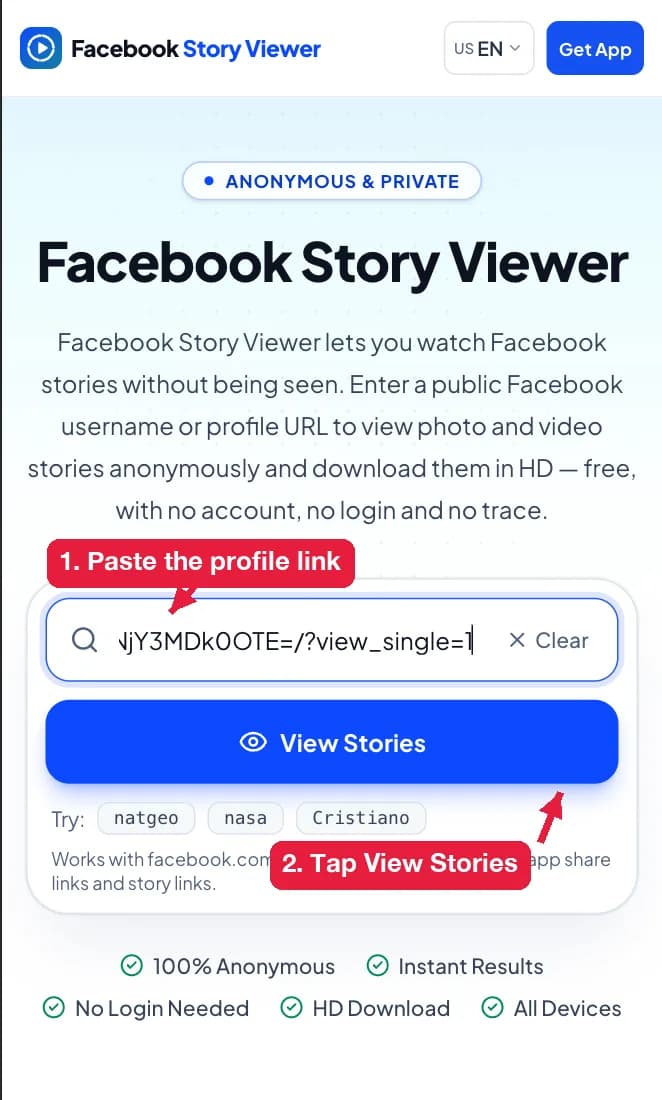

The search box accepts 4 link types: a facebook.com/username link, a profile.php?id= link, a share link from the Facebook app, or just the username. Links to posts, groups and Reels don’t point to a story tray, so they return nothing.
The limit is simple. This method only shows stories set to Public. Friends-only and custom stories stay hidden, and any site that says otherwise is lying.
2. Turn on airplane mode before opening the story
Airplane mode lets the Facebook app load a story while your phone is offline, so the view isn’t sent right away.
- Open the Facebook app and wait 10 to 15 seconds for the stories tray to load.
- Turn on airplane mode.
- Open the story and watch it.
- Close the app completely before you turn airplane mode off.
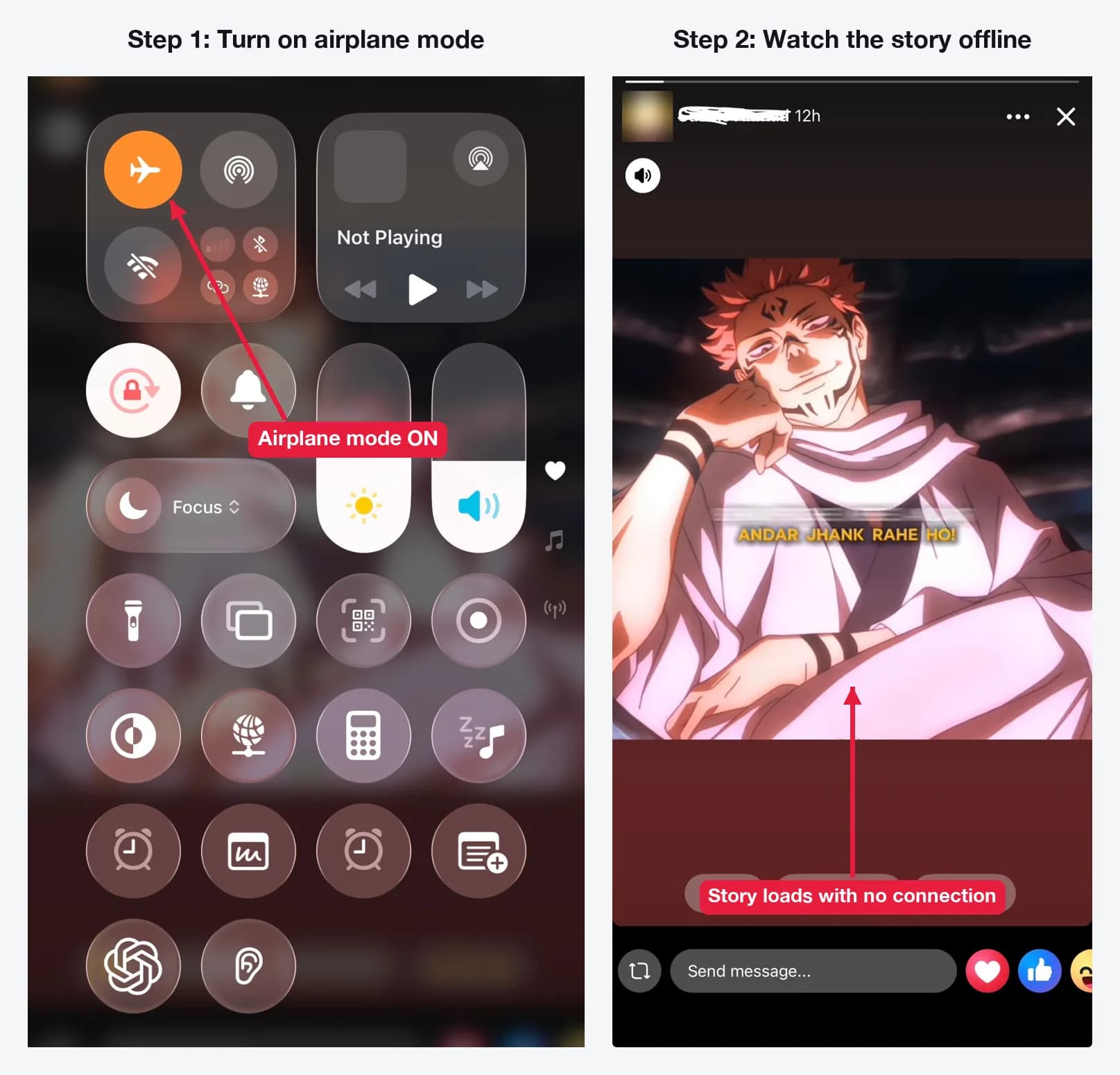
It’s unreliable. Facebook often preloads only the first part of a story, and the app sends the view once you reconnect if it didn’t fully close. You also need to be logged in, so it never works for people you’re blocked by.
3. Half-swipe into the story
Half-swiping means opening the story next to the one you want, then dragging slowly toward the target story without letting go. You see a preview of the first frame. When you release your finger before the story fully opens, the view usually isn’t counted.
It works for a glance at a photo story. It doesn’t work for video, and one slip of your thumb counts as a full view.
4. Use a second Facebook account
A second account keeps your main name off the list, but the owner still sees a viewer. It’s just a different name.
I wouldn’t do this. Facebook’s rules allow one personal account per person, and fake accounts get flagged and removed. It also takes more effort than method 1 for the same result.
Which method should you use? The table below compares the 4 methods on the things that matter.
| Method | Needs a Facebook account | Your name on the list | Works for private stories | Reliability |
|---|---|---|---|---|
| Web-based story viewer | No | No | No | High |
| Airplane mode | Yes | Sometimes | Only if you can already see it | Low |
| Half-swipe | Yes | Sometimes | Only if you can already see it | Low |
| Second account | Yes (a second one) | A different name shows | Only if that account can see it | Medium |
How do you pick a safe anonymous story viewer?
A safe anonymous story viewer asks for nothing except a profile link. These 5 checks separate the safe ones from the risky ones:
- It never asks for your Facebook login. A viewer that wants your password is a phishing risk.
- It says it only works with public stories. Any claim about private stories is false.
- It runs in the browser. Extensions often ask to read data on every site you visit.
- It has a privacy policy. Look for what it stores and for how long.
- It doesn’t force a sign-up or payment before you see a single story.
Can you view private Facebook stories anonymously?
No. Private stories are only sent to the accounts the owner picked, so no outside tool can load them. If you post stories yourself, this is also how you protect them: control who can see your Facebook story by setting it to Friends or Custom.
Does the story owner get notified when you view anonymously?
No. Facebook doesn’t send notifications for story views at all. Views only show up inside the owner’s viewer list, and an anonymous view isn’t added there. The Facebook story viewer list only records logged-in accounts.
Can you download a story while viewing anonymously?
Yes, for public stories. Photo stories save as JPG files and video stories save as MP4 files. Here’s the full process to download a public Facebook story on iPhone, Android and desktop.
Is anonymous story viewing legal?
Watching content that someone posted publicly is generally fine. Reposting it is where problems start, because the story still belongs to the person who made it. Keep anything you save for personal reference, and don’t use any method to monitor someone who doesn’t want contact with you.