How to Add Music to a Facebook Story
Add a song to a Facebook story with the Music sticker, pick the clip, show lyrics, and fix the Music option when it’s missing.

By Ayu Moz
Writer, Facebook Story Viewer
Last updated:
5 min read
To add music to a Facebook story, open the story editor in the Facebook app, tap the sticker icon, choose Music, and pick a song. You can only use songs from Facebook’s music library, and the feature works in the mobile app, not on a computer.
There are 2 ways to do it: start a music story from scratch, or put a song on top of a photo or video. If you haven’t posted a story before, start with how to create a Facebook story and come back here.
How do you create a music story on Facebook?
You create a music story by choosing Music as the story format. This gives you a song with a colored background or a photo behind it.
- Tap Create story at the top of your Feed.
- Tap Music at the top of the screen.
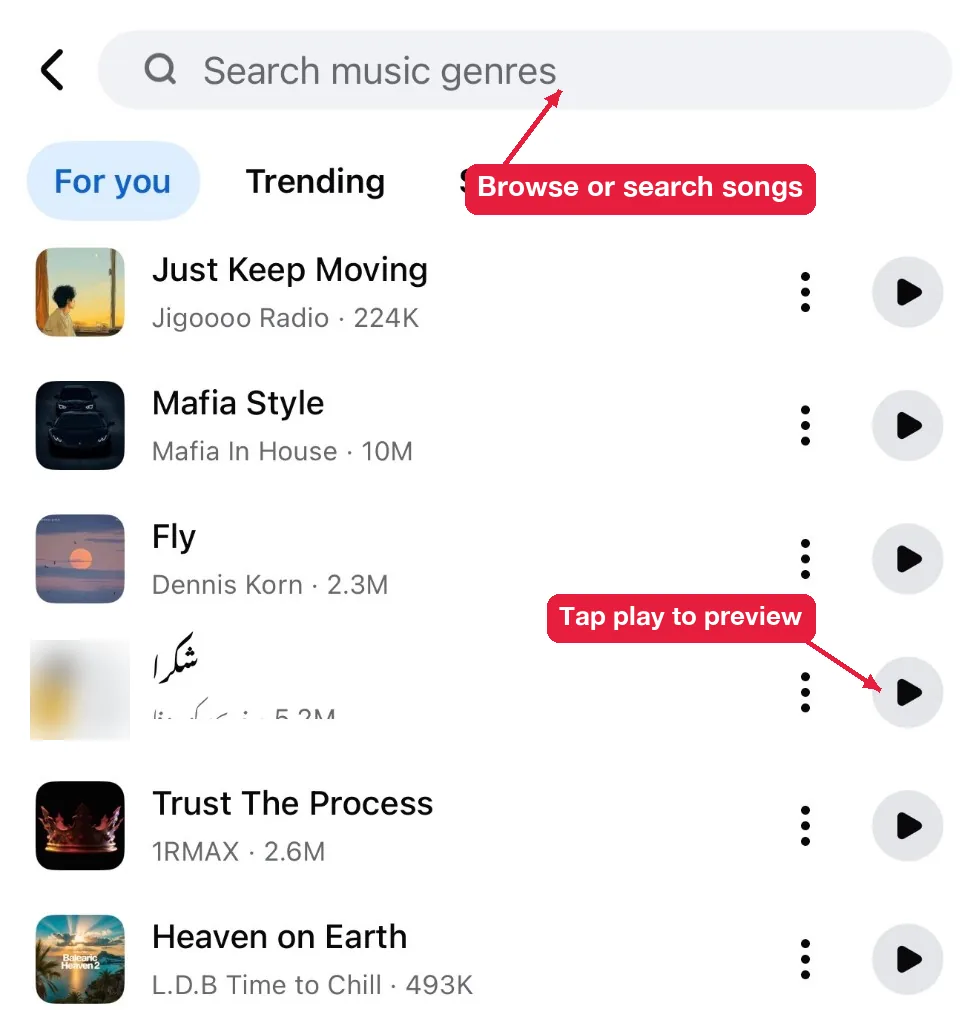
- Browse the For you, Trending or Saved tabs, or search, then tap a song. Tap the play button first if you want to preview it.
- Choose a display style and tap Done.
- Tap Share to story.
How do you add music to a photo or video story?
You add music to a photo or video with the Music sticker.
- Tap Create story and pick a photo or video.
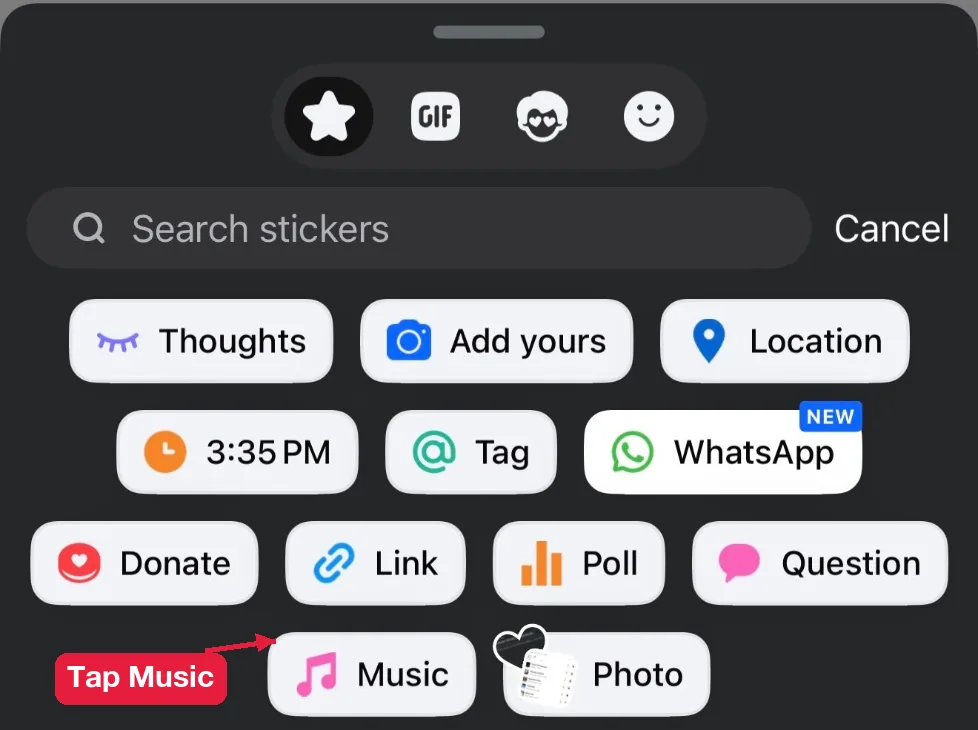
- Tap the sticker icon (the square smiley face) at the top.
- Tap Music.
- Pick a song.
- Tap Share to story when you’re done editing.
The steps are the same on iPhone and Android. Only the position of the sticker icon changes a little between the two apps.
On a video, the song plays over the original sound. Turn the video’s own audio down on the edit screen if you only want the song.
Which one should you use? Use a Music story when the song is the point, like sharing what you’re listening to. Use the Music sticker when the photo or video is the point and the song is background.
How do you choose the song clip and show lyrics?
You choose the clip by dragging the slider under the song, and you show lyrics by picking a lyrics display style.
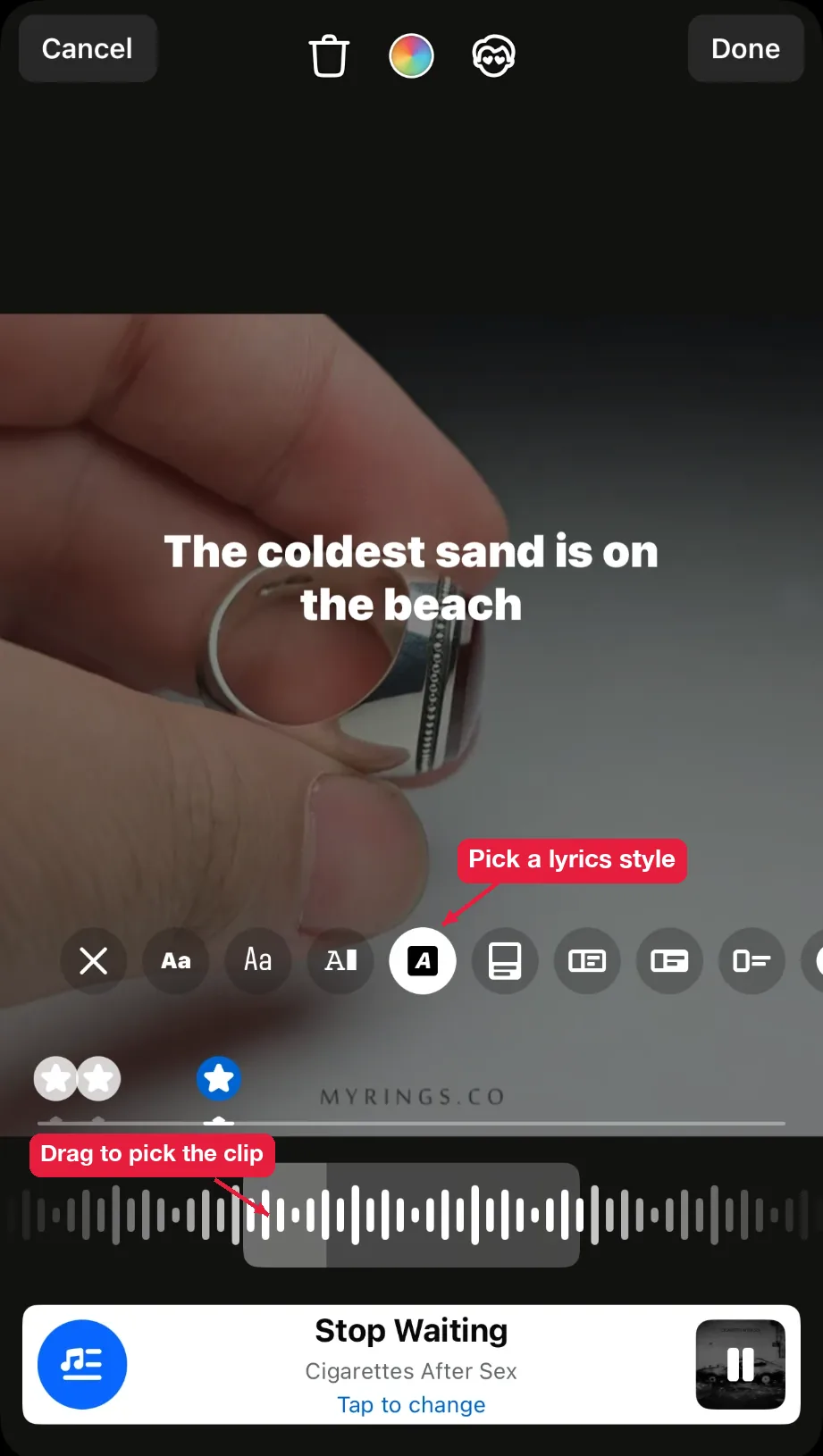
- Tap the music sticker after you add it.
- Drag the slider left or right to choose the part of the song. The clip plays in a loop while you choose.
- Tap the display styles at the bottom. Styles marked with lyrics show the words on screen in time with the song.
- Tap Done. To swap the song before posting, tap Tap to change under the song name.
The clip is only a few seconds long, so pick the part of the song people know, like the chorus.
Not every song has lyrics. Look for the Lyrics label next to the song name in the library.
Why can’t you add music to your Facebook story?
You can’t add music when the feature isn’t available in your country or account, when your app is outdated, or when the song isn’t licensed for stories. Each problem has a different fix.
The Music option is missing
The Music option is missing because Facebook hasn’t rolled it out to every country and account yet. Try these 3 fixes in order:
- Update the Facebook app from the App Store or Google Play.
- Log out and back in to refresh your account features.
- Check the sticker tray if the Music button isn’t at the top. It sometimes moves there.
If none of these work, the feature isn’t available for your account yet. There’s no setting that turns it on.
The song you want isn’t in the library
The song isn’t there because Facebook only offers songs it has a license for, and licenses change by country. A song available in the US might not show in the UK. Search by the artist name too, since some songs are listed under a different title.
Pages and business accounts have fewer songs
Pages and business accounts get a smaller music library because commercial use needs a different license. Some popular songs are only available to personal profiles. If music is central to your brand, plan around the songs you actually have access to. It’s one of the things to build into your Facebook story content strategy.
Can you add your own music?
No, not through the music sticker. The only workaround is to edit your video with the song in another app, like CapCut, and upload the finished video. Facebook still checks the audio, and copyrighted songs can get muted or blocked.
Why doesn’t the music play when people watch?
The music doesn’t play when the viewer’s phone is on silent or their story volume is muted. That’s on their side, not yours. Open your story on your own phone with the sound on to confirm the song is there.
Can you add a voiceover instead of a song?
Yes. Record the video with your voice using the camera inside Create story, or record it with your phone camera and upload it. The original sound stays unless you turn it down. A voiceover avoids music licensing problems completely, which makes it the safer choice for Pages.
Can you change the song after posting?
No. Once a story is live, the song is locked. Delete the story and post it again with the new song.
Can you add music to a story from a computer?
No. The story editor on facebook.com only offers photo and text stories, without the music sticker. Use the Facebook mobile app instead.
Once your story is live, open the viewer list to see who watched and who reacted. Here’s how to see who viewed your Facebook story on your phone or computer.