How to Delete a Facebook Story Before 24 Hours
Delete a Facebook story early on iPhone, Android, laptop or desktop. Also how to remove one card, delete Page stories, and what deleting doesn’t undo.

By Ayu Moz
Writer, Facebook Story Viewer
Last updated:

5 min read
To delete a Facebook story before 24 hours, open your story, tap the three dots in the top-right corner, and tap Delete photo or Delete video. The story disappears from your profile and from everyone’s stories tray right away.
The steps are almost the same on phones, laptops and Pages. Each version is below, plus what deleting does and doesn’t undo.
How do you delete a Facebook story on your phone?
You delete a Facebook story on iPhone or Android from the three-dot menu on the story.
- Tap Your story at the top of your Feed.
- Go to the photo or video you want to remove.
- Tap the three dots in the top-right corner.
- Tap Delete photo or Delete video, then tap Delete to confirm.
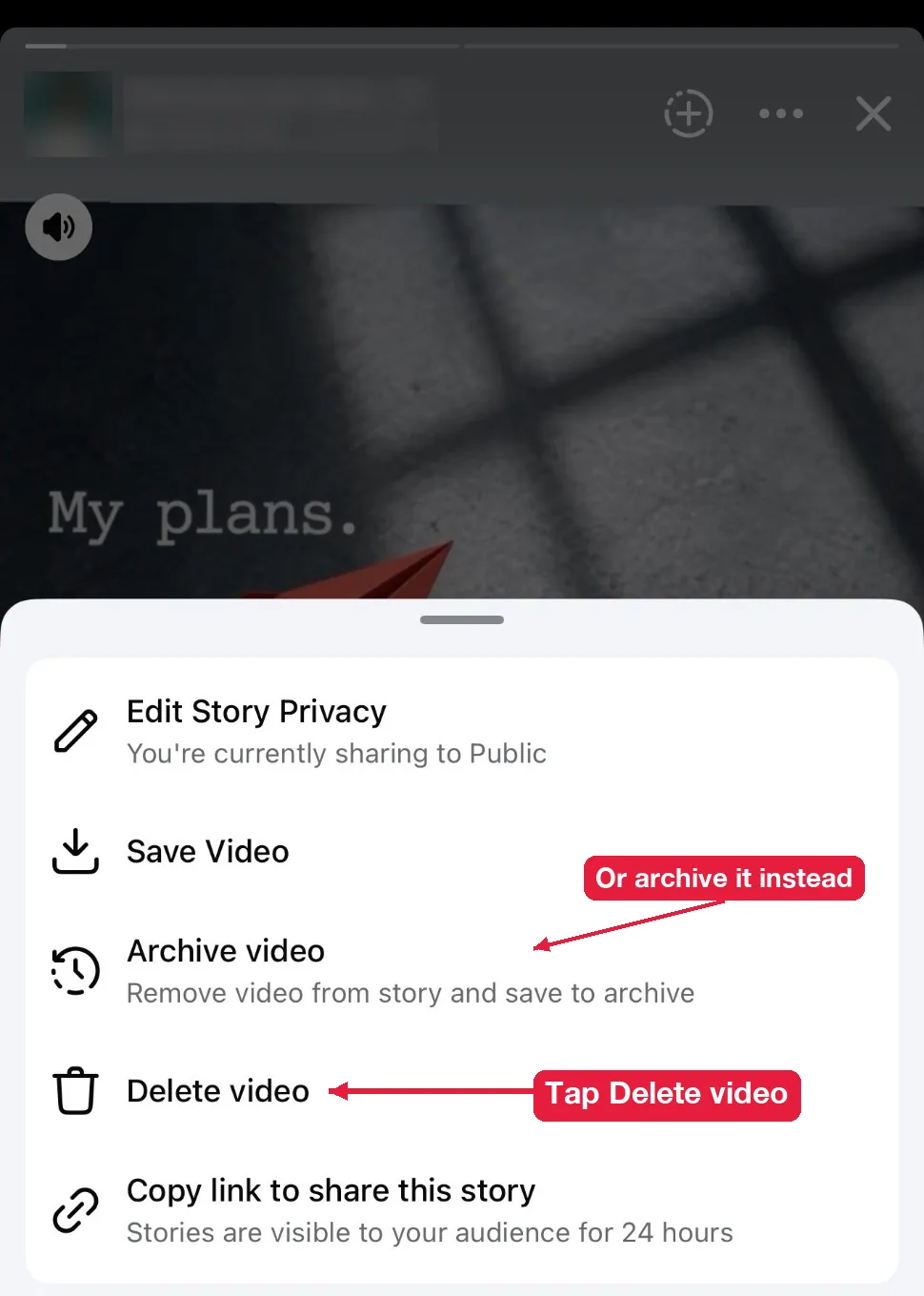
The same menu also has Archive video (or Archive photo). It removes the story from your profile right away but keeps a private copy in your archive. Pick that one if you might want the story back later. When we tested it, the desktop menu only offered Delete, so use the app if you want to archive.
The same steps work in Facebook Lite. The menu might say Delete instead of Delete photo.
How do you delete a Facebook story on a laptop or desktop?
You delete a story on a laptop or desktop from facebook.com, in any browser.
- Go to facebook.com and click Your story in the stories row.
- Click to pause the story on the photo or video you want gone.
- Click the three dots at the top right of the story.
- Click Delete photo or Delete video, then Delete to confirm.

Mac or Windows doesn’t matter here. It’s the same website, and the steps are the same in Chrome, Safari, Edge and Firefox.
How do you delete one photo from a story with several?
You delete one photo by opening that exact card before you tap the three dots. Each photo or video in your story is its own card, so deleting one leaves the others live.
Tap the left or right side of the screen to move between cards. When the card you want to remove is showing, use the steps above. The rest of your story keeps playing for its remaining hours.
How do you delete a story you shared from Instagram?
You delete it on both apps separately. Deleting the story on Instagram doesn’t remove the copy on Facebook, and the other way around. Open your Facebook story and delete it with the steps above, then do the same in Instagram.
How do you delete a story from a Facebook Page?
You delete a Page story the same way, after switching to the Page.
- Tap your profile picture and switch to the Page.
- Open the Page’s story.
- Tap the three dots, then Delete.
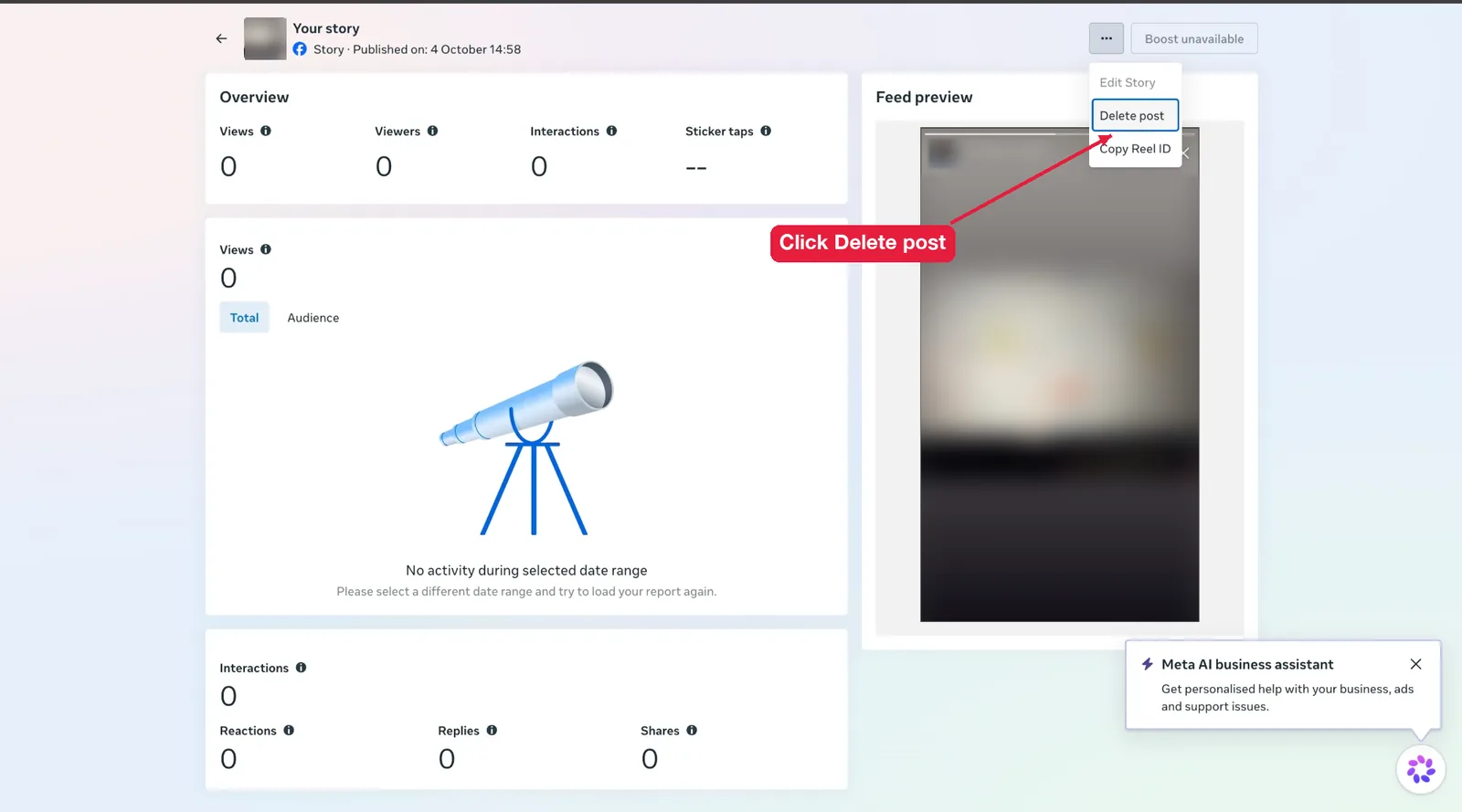
In Meta Business Suite, go to Content, then Stories, and click the story to open its details. Click the three dots at the top right, then Delete post. Meta calls it a post here, but it deletes the story. Business Suite is also where you cancel scheduled stories before they go live.
What happens when you delete a Facebook story?
When you delete a Facebook story, 4 things happen right away:
- It leaves your profile and every stories tray.
- Its viewer list is gone, along with the view count.
- Replies stay in Messenger. People who replied still have that chat.
- It’s removed for good. Facebook has no undo or trash folder for stories.
What deleting can’t undo is anything people already saved. Viewers can take screenshots, and public stories can be saved with tools that download Facebook stories. If a story was Public for an hour, assume someone could have kept it.
What if you can’t, or don’t want to, delete it?
If you can’t delete a story, it’s usually still uploading or it’s not yours to delete. If you don’t want to delete it, there are better options than deleting.
The Delete option is missing
The Delete option is missing while a story is still uploading. Wait for it to finish, or tap the failed upload and choose to discard it. Also check that you’re viewing your own story and not a story you’re tagged in. You can’t delete someone else’s story, but you can remove your tag or report it.
Can you delete several stories at once?
No. Facebook has no bulk delete for stories. You delete them one card at a time, which is quick if you only have a few.
Do people get notified when you delete a story?
No. Facebook doesn’t tell anyone. The story just stops showing in their tray.
Should you delete or let it expire?
Let it expire unless there’s a real reason to delete it, like a mistake, private information or something you regret. Expired stories go to your private archive, so you keep a copy. Deleted stories are gone.
Can you recover a deleted story?
No. Facebook doesn’t keep a recoverable copy once you delete a story. If you saved it to your phone or it was archived before you deleted it, that copy is the only one left.
Can you delete stories from your archive?
Yes. Expired stories sit in your story archive on Facebook, and you can open any of them and delete it from the three-dot menu. After you delete a live story, check the archive. If a copy is still there, delete it there too.
Can you hide a story without deleting it?
Yes. Change the audience from Public to Friends or Custom, or hide it from specific people. The change applies to stories that are already live. Here’s how to change who can see your Facebook story.
Deleted it because of a typo? Fix it and post again. Here’s how to create a Facebook story with the right settings from the start.