How to Control Who Can See Your Facebook Story
Set your Facebook story to Public, Friends or Custom, hide it from specific people, and mute or unmute other people’s stories. Steps for the app and desktop.

By Ayu Moz
Writer, Facebook Story Viewer
Last updated:
5 min read
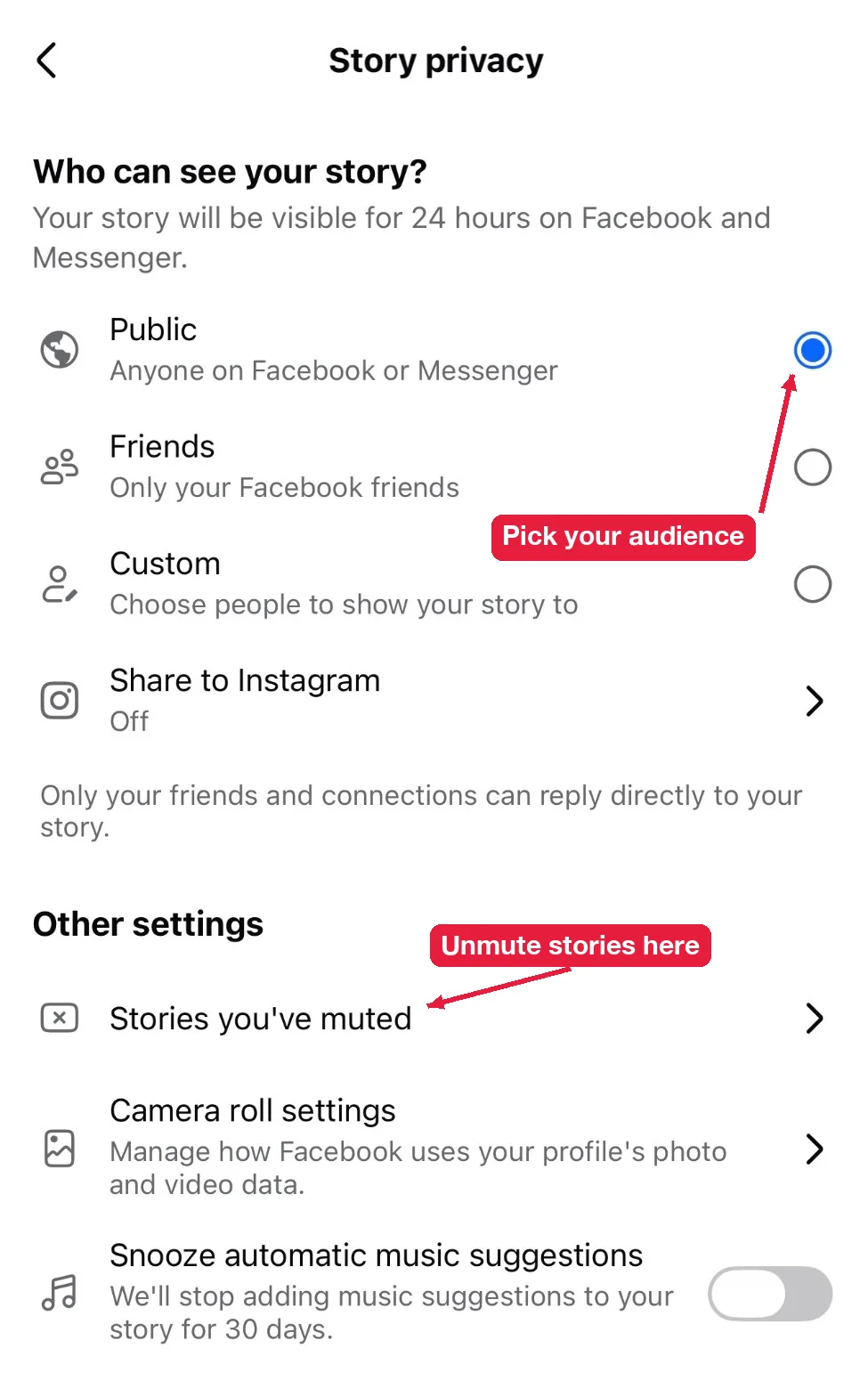
You control who can see your Facebook story with the story privacy setting. Facebook gives you 3 audiences: Public, Friends and Custom, plus a “Hide story from” list under Friends for people you want to leave out. The setting applies to the stories you have live right now and to every story you post after.
This guide covers all of it, then the other side: how to mute stories you don’t want to see.
What are the Facebook story privacy options?
Facebook has 3 story audiences, and each one reaches a different group of people:
| Audience | Who can see your story | Best for |
|---|---|---|
| Public | Anyone on Facebook or Messenger, including followers and people who aren’t your friends | Creators, public figures, businesses |
| Friends | Only your Facebook friends | Most personal accounts |
| Custom | Only the specific people you pick | Close friends, family, a small group |
Whatever you pick, only your friends and connections can reply directly to your story. Everyone else can only watch.
How do you change your story audience?
You change your story audience from the story settings in the Facebook app.
- Tap Create story at the top of your Feed.
- Tap the gear icon (Settings) in the top corner.
- Tap Story privacy.
- Choose Public, Friends or Custom.
- Tap Save or the back arrow.
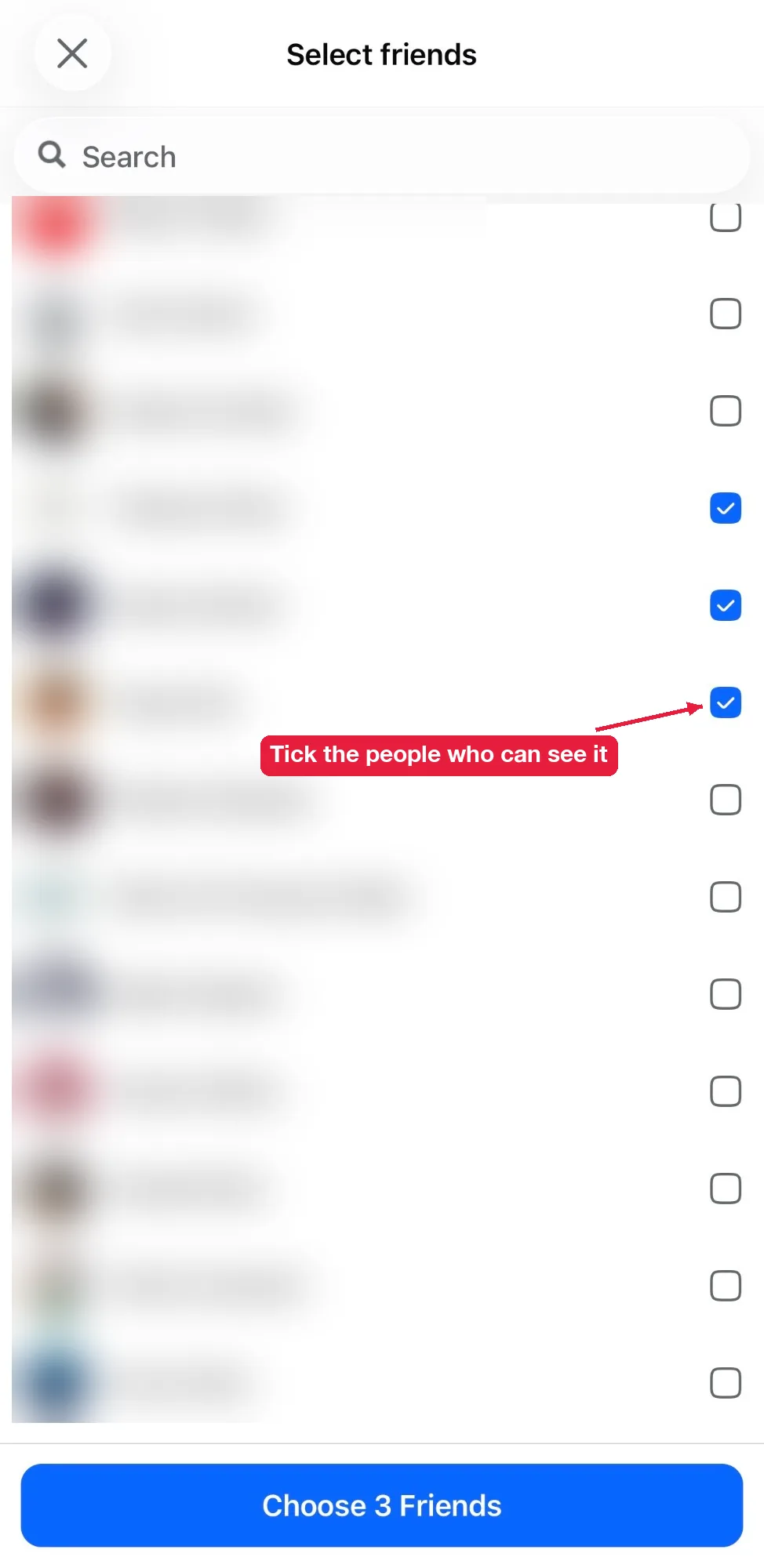
When you pick Custom, Facebook opens a Select friends list. Tick everyone who should see your story, then tap the button at the bottom, which shows how many people you picked (for example Choose 3 Friends).
On a computer, click Create story on facebook.com, then click the audience button (it shows your current setting) and pick a new one.
You can also change it for one story. Tap the audience button on the editing screen before you share. The change sticks for your next stories too, so check it the next time you post.
What happens when you change your story privacy?
When you change your story privacy, 3 things happen:
- Stories that are live right now switch to the new audience immediately.
- Every story you post next uses the new audience too.
- People who already watched stay on the viewer list. The change doesn’t remove past views.
So if you posted something as Public by mistake, change the audience right away. The sooner you switch, the fewer people see it.
How do you hide your Facebook story from someone?
You hide your story from someone with the Hide story from option, which appears when you choose Friends.
- Tap Create story, then the gear icon.
- Tap Story privacy, then choose Friends.
- Tap Hide story from.
- Search for the person and tick their name. Add as many people as you want.
- Go back to save.
Want the opposite, a small group instead of everyone but a few? Choose Custom and tick only the people who should see it.
Facebook doesn’t notify people you hide stories from, and they stay on your friends list. Their story tray simply won’t show yours. To confirm it worked, check your viewer list on your next story. Here’s how to see who viewed your Facebook story.
Can people outside your audience still see your story?
Only if your story is Public. A Public story is open to anyone, including people who aren’t logged in. That’s how people view Facebook stories anonymously without showing up on your viewer list.
Friends and Custom stories are different. Facebook only sends them to the accounts in your audience, so no outside tool can reach them.
Want to check what strangers see? Paste your own profile link into an anonymous Facebook story viewer. If your story appears there, it’s Public. If nothing shows, it’s limited to your audience.
How do you control whose stories you see?
You control whose stories you see by muting them. Muting is the opposite of hiding: hiding stops someone from seeing your stories, and muting stops you from seeing theirs.
Is there a Close Friends list for Facebook stories?
No. Facebook doesn’t have a separate Close Friends feature like Instagram. Use Custom instead and pick the people you want. Facebook remembers your Custom list, so you don’t have to rebuild it every time.
Do Facebook Page stories have privacy settings?
No. Page stories are public, like everything else a Page posts. If you need a private audience, post from your personal profile with Friends or Custom.
How do you mute someone’s story?
You mute someone’s story from the story itself.
- Open their story from the stories tray.
- Tap the three dots in the top-right corner.
- Tap Mute [name]’s Story.
- Confirm if Facebook asks you to.
On the Facebook app, you can also long-press their story in the tray and choose the mute option.
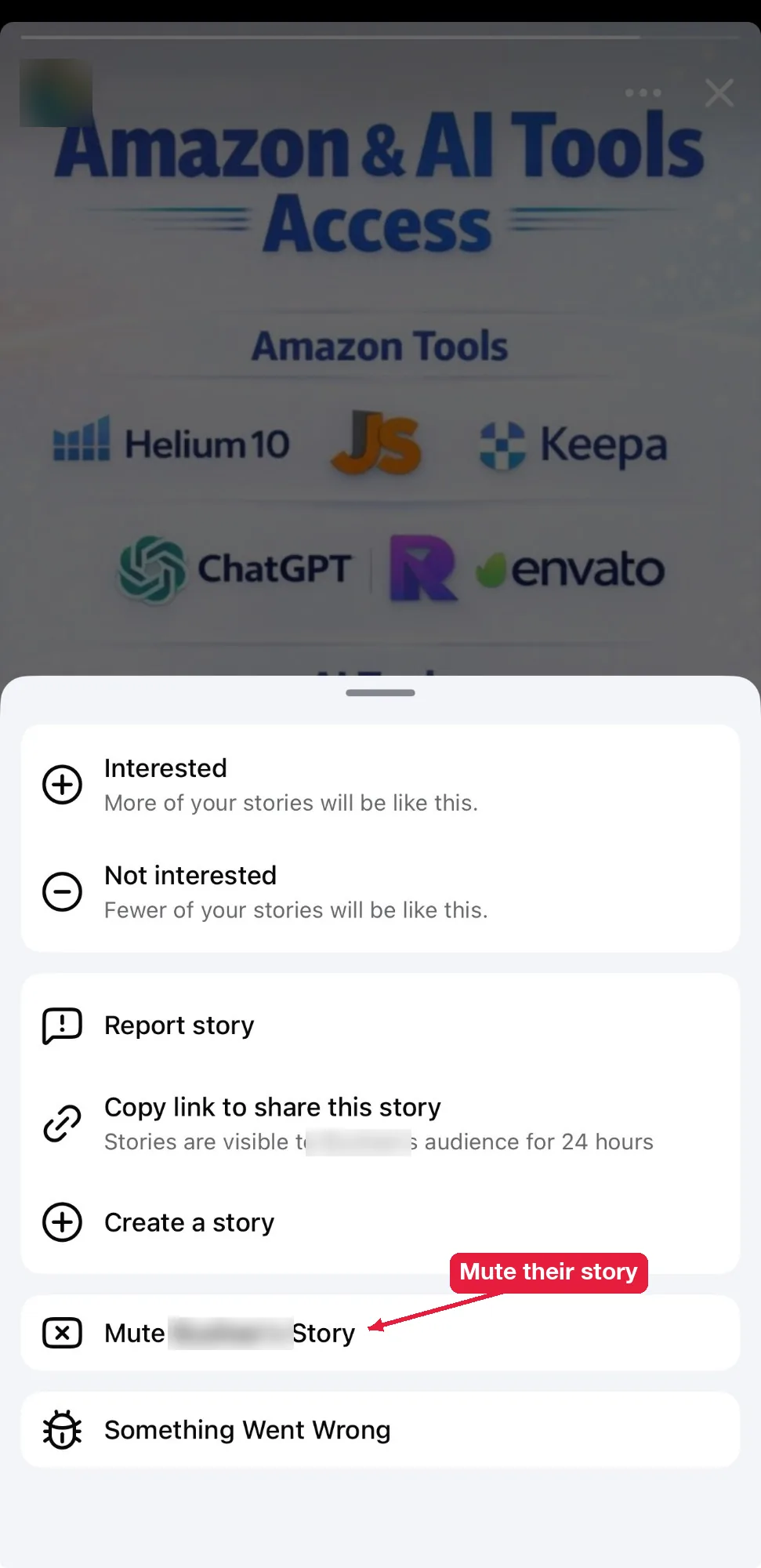
Their stories stop showing at the top of your Feed. You stay friends, and you still see their regular posts.
How do you unmute someone’s story?
You unmute someone’s story from your story settings. Tap Create story, then the gear icon, then Story privacy, and open Stories you’ve muted. Tap Unmute next to the person. You can also open their profile, tap the three dots, and look for Unmute story. Their stories return to your tray right away.
If the option isn’t there and you still can’t see their stories, something else is going on. Go through the reasons for Facebook stories not showing.
Does the person know you muted them?
No. Facebook doesn’t notify anyone when you mute or unmute their stories. Only you can see who you’ve muted.
Should you mute, hide or block?
It depends on what you want to stop:
- Mute when you don’t want to see their stories, but nothing else changes.
- Hide your story from them when you don’t want them to see yours.
- Block when you want no contact at all, in both directions.
Most people only need the first two. Blocking is for real problems, like harassment, because it also removes the friendship and stops messages.